Discover five practical Kiro workflows for Infrastructure as Code, from project scaffolding and module generation to convention enforcement.
When it comes to generating Terraform modules, creating documentation, or even automating testing, AI-powered tools have become a natural part of the developer workflow. But using them effectively for Infrastructure as Code requires more than just prompting. It requires structure.
In this article, we’ll walk through five practical tools and workflows integrating Kiro into everyday IaC development. Whether you’re setting up a new project from scratch, generating OpenTofu modules, or enforcing naming conventions across a multi-account landing zone, these patterns will help you get more out of Kiro while keeping your IaC clean, well-documented, and maintainable.
Reviewing the basic concepts
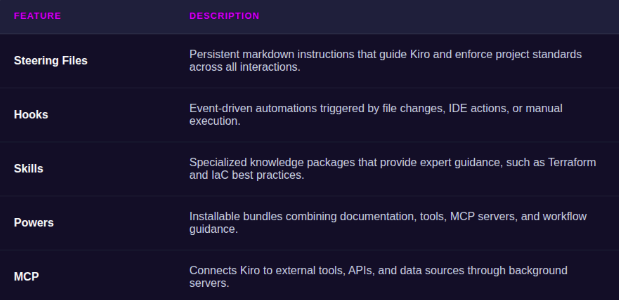
Kiro is an AI-powered IDE built by AWS that goes beyond simple code generation. With features like steering files, hooks, specs, and skills, it gives you a framework to set up custom conventions, automate repetitive tasks, and maintain consistency across your infrastructure codebase.
Before diving into the workflows, let’s review the key Kiro concepts we’ll be using throughout this article.
In addition to the tips described in this article, we use this public skill with the AWS API and Terragrunt Docs MCP servers.
Tip 1: Setting up a project skeleton
Starting a new IaC project usually means copying the same set of boilerplate files, folder structure, root configs, CI pipelines, pre-commit hooks, and tool definitions. It’s not complex work, but it’s tedious and easy to get wrong when done manually.
To solve this, we use a user-level steering file. User-level steering lives in ~/.kiro/steering/ and applies across all workspaces, not just a single project. Ours includes instructions that direct Kiro to a local template folder containing our standard project skeleton.
When we open a fresh workspace and ask Kiro to set up the project, it reads the steering file, copies the relevant files from our template directory, and scaffolds everything in place. Folder layout, mise.toml, root.hcl, project.hcl, GitHub Actions workflows, pre-commit config, all landed in one go, following conventions from the start.
The benefit here is consistency. Every new project starts from the same foundation, and we never have to remember which files to copy or which values to update. If our template evolves, we update it in one place and every future project picks it up automatically.
inclusion
manual
Terragrunt Project Template
When asked to scaffold a new Terragrunt project, copy the structure from ~/templates/terragrunt/ into the current workspace.
Most of the time, when setting up new infrastructure for a project, we like to use already existing, well-tested public modules. In that way, we don’t have to develop and maintain modules, and we can rely on solutions that have already been proven in production environments.
There are some exceptions, though, where we need heavy customization and a special set of resources. In these cases, we add a custom module to our stack. Generating Opentofu modules is a fairly straightforward and repetitive task, making it an ideal candidate for AI assistance, so instead of manually creating the module structure, variables, outputs, documentation, and tests, we can use Kiro to automate much of the boilerplate and focus on the implementation details that are specific to our use case.
To make this workflow more reliable, we set up two components:
1. A Kiro steering file containing all conventions
Although the public skill we use already includes a set of best practices for developing Infrastructure as Code (IaC), we also maintain a dedicated steering file that defines our organization’s specific requirements and conventions. This ensures that all generated code adheres not only to general IaC best practices but also to our internal standards, naming conventions, and architectural guidelines. By combining skills with project-specific steering files, we can achieve both consistency and flexibility across our infrastructure codebase.
2. A Kiro hook that can be used to start the workflow quickly
This custom hook is configured to run only when triggered manually. Rather than containing a lengthy, detailed prompt, it references the conventions defined in our Steering Files. This approach makes the hook easier to maintain, as updates to coding standards or project requirements only need to be made in a single location. It also helps ensure that all checks remain aligned with the latest conventions without having to modify the hook itself.
Kiro steering:
inclusion
manual
Module Creation Workflow
When creating a fully implemented OpenTofu module, follow this workflow.
Steps
Ask: "What should this module do?" — get a description of AWS resources and behavior
Ask for a module name (kebab-case, validate against ^[a-z][a-z0-9]*(-[a-z0-9]+)*$, no conflicts with existing modules/ dirs)
Create all 5 files in modules/{name}/
Run tofu fmt on the module directory
Ask if deployment wiring is needed
File Generation Rules
versions.tf
Use the standard provider pinning block from opentofu.md steering
variables.tf
All variables needed for the resources
Always include tags variable (map(string), default {})
Add validation blocks for constrained inputs (CIDRs, enums, ranges)
This file contains hidden or bidirectional Unicode text that may be interpreted or compiled differently than what appears below. To review, open the file in an editor that reveals hidden Unicode characters. Learn more about bidirectional Unicode characters
"description": "Creates a fully implemented custom OpenTofu module with real resource definitions based on user requirements.",
"version": "1",
"when": {
"type": "userTriggered"
},
"then": {
"type": "askAgent",
"prompt": "Follow the module-creation steering file (#module-creation.md) to create a fully implemented OpenTofu module. Start by asking what the module should do."
As a project grows, keeping conventions consistent becomes harder. With Kiro, we can also encode our conventions directly into steering files. Kiro can even analyze an existing codebase and extract the appropriate conventions. It looks at the patterns already in use, like variable naming, tag structures, and module layout, and produces a markdown document that captures them as rules.
Terragrunt is the deployment orchestrator. It handles remote state, provider generation, and multi-account role assumption.
Agent Instructions
Always use terragrunt CLI commands — never call tofu directly for deployment
When running commands across all modules: terragrunt run-all <command>
When targeting a single module: run terragrunt <command> from within its live/ directory
Terragrunt version managed by mise (terragrunt = "1.0.0")
Config Hierarchy
project.hcl — single source of truth for org-wide values (project name, account IDs, emails, org/OU IDs)
root.hcl — remote state config (S3 bucket naming: {project}-{env}-terraform-state) and provider generation with role assumption (terragrunt-execution-role)
account.hcl — account name and AWS account ID only
env.hcl — all module configuration values for a given account+region scope; includes skip_module map and tags block
Module Deployment Pattern
Each module deployment is a thin terragrunt.hcl that:
Sources either a local module (../../../../modules/{name}) or external git module with pinned ref
Includes root.hcl (for backend/provider)
Includes env.hcl with expose = true and merge_strategy = "no_merge"
Passes inputs from include.env.locals.*
Uses exclude block with include.env.locals.skip_module.{name} for conditional deployment
When Writing terragrunt.hcl Files
Always include root.hcl for backend/provider
Include env.hcl with expose = true and merge_strategy = "no_merge"
Pass inputs from include.env.locals.*
Add exclude block referencing skip_module map
Source local modules as ../../../../modules/{name} or external with pinned ref
Skip Module Pattern
Each env.hcl defines a skip_module map with boolean values per module. Set to true to exclude a module from deployment without removing its directory:
skip_module={
vpc =false
s3 =true# skipped
}
External Module References
Pin external modules with exact git refs (no latest, no branch names):
S3 state buckets: {project}-{account}-terraform-state
Variable names in env.hcl: snake_case, prefixed by module context (vpc_cidr, budget_limit_amount)
State Locking
This project uses S3 native state locking (use_lockfile = true) instead of DynamoDB. This requires OpenTofu >= 1.10 (we use 1.11.2). S3 creates a .tflock file next to the state file using conditional writes — no DynamoDB table needed.
Do NOT use dynamodb_table in backend config — it is deprecated
Do NOT create DynamoDB lock tables for new accounts
If migrating an existing account from DynamoDB locking, remove the dynamodb_table argument and add use_lockfile = true
Tagging Strategy
All resources must be tagged. Tags are defined once in env.hcl and passed to modules via inputs.
Required Tags
Every resource must include these tags (no exceptions):
Tag
Value
Description
AccountType
platform or workload
Distinguishes shared infra accounts from workload accounts
CreatedBy
terragrunt
Always this value for IaC-managed resources
Environment
{account_name}
Matches the account name (e.g., production, development)
Owner
{project}
Project name from project.hcl
Project
{project}
Project name from project.hcl
Version
{project_version}
Semantic version from project.hcl
Tag Block Template (in env.hcl)
tags={
AccountType ="platform"# or "workload"
CreatedBy ="terragrunt"
Environment ="${local.env}"
Owner ="${local.project}"
Project ="${local.project}"
Version ="${local.project_version}"
}
Agent Instructions for Tagging
When creating a new env.hcl, always include the full tags block — copy from existing env files
When creating a new module, accept a tags variable of type map(string) and apply it to all resources
Never hardcode tag values inside modules — they must come from env.hcl via inputs
AccountType must be "platform" for shared accounts (management, security, shared-services, monitoring) and "workload" for application accounts (development, production, sandbox)
Never add tags that contain sensitive info (account IDs, secrets, internal URLs)
If a resource supports tags_all (e.g., AWS provider default tags), prefer passing tags via the provider; otherwise pass explicitly per resource
Module Variable Pattern
Every module that creates taggable resources must include:
variable"tags" {
description="Tags to apply to all resources"type=map(string)
default={}
}
# Plan all modules in an account/region
terragrunt run-all plan
# Apply a single module
terragrunt apply # (from within live/{account}/{region}/{module}/)# Format all HCL
terragrunt run-all fmt
# Validate all modules
terragrunt run-all validate
Versioning
Semantic versioning via semantic-release
Conventional commits required (enforced by commitizen)
In the past, our checks were usually handled by external tools, like checkov or tfsec. We did not quit using them, of course. They are reliable tools to use locally as well as in workflows. But now we also utilize Kiro’s capabilities. We built hooks that trigger on file save. Whenever we edit an OpenTofu or Terragrunt file, the hook asks the agent to review the changes against known best practices. This includes things like:
Missing encryption configuration on storage resources
Overly permissive IAM policies
Resources without proper tagging
Security groups with wide-open ingress rules
Missing lifecycle policies or backup configurations
The hooks use an askAgent action with a prompt referencing our steering files and the Terraform skill. It’s not a replacement for a proper security scanner in CI, but it catches the obvious mistakes early and keeps us from committing code that we’d have to fix later.
Here’s a simple example to get started. This hook automatically reviews files against best practices whenever they are saved:
This file contains hidden or bidirectional Unicode text that may be interpreted or compiled differently than what appears below. To review, open the file in an editor that reveals hidden Unicode characters. Learn more about bidirectional Unicode characters
"description": "Reviews saved Terraform and Terragrunt files against IaC best practices, checking for security issues, missing encryption, overly permissive IAM, missing tags, and other common mistakes.",
"version": "1",
"when": {
"type": "fileEdited",
"patterns": [
"**/*.tf",
"**/*.hcl"
]
},
"then": {
"type": "askAgent",
"prompt": "Review the saved file against IaC best practices. Check for:\n- Missing encryption at rest (S3, EBS, RDS, DynamoDB)\n- Overly permissive IAM policies (wildcard actions or resources)\n- Security groups with wide-open ingress (0.0.0.0/0 on sensitive ports)\n- Missing tags (all resources must have tags applied via var.tags)\n- Missing lifecycle policies or backup configurations\n- Hardcoded values that should be variables\n- Resources without descriptions on variables/outputs\n- Missing validation blocks on constrained inputs\n\nFollow the project's OpenTofu and Terragrunt conventions from steering. If issues are found, list them concisely with suggested fixes. If the file looks good, say so briefly."
We wouldn’t recommend using it as-is during active development, since the fact that it triggers on every save can make it consume a significant number of tokens.
Tip 5: Writing documentation
Documentation is the first thing to fall behind when infrastructure evolves quickly. Module READMEs go stale, variable descriptions get outdated, and architectural decisions live only in someone’s head.
We use Kiro to keep documentation in sync with the code by combining two approaches:
First a hook that triggers when module files change. Whenever main.tf, variables.tf, or outputs.tf is modified, the hook runs terraform-docs to regenerate the module’s README automatically. This ensures that variable descriptions, types, defaults, and outputs are always up to date without manual effort.
Second, for higher-level documentation, we use the agent directly. After implementing a significant change, we ask Kiro to document what was done and why. Because it has the full context of the codebase through steering files and the files it just modified, the documentation it produces is accurate and specific rather than generic boilerplate.
The combination means our docs stay current at both levels: the mechanical reference documentation (generated automatically) and the human-readable explanations (written with context). Neither requires us to context-switch away from the actual infrastructure work.
Are you interested in this topic? Do you have any questions about the article? Book a free consultation and let’s see how the Code Factory team can help you, or take a look at our services!